Best Employee Scheduling Software for Small and Medium-Sized Businesses
Compare employee scheduling software built for small and medium-sized businesses and see which platform is the best fit for shift coverage, team visibility, accountability, and day-to-day operations.
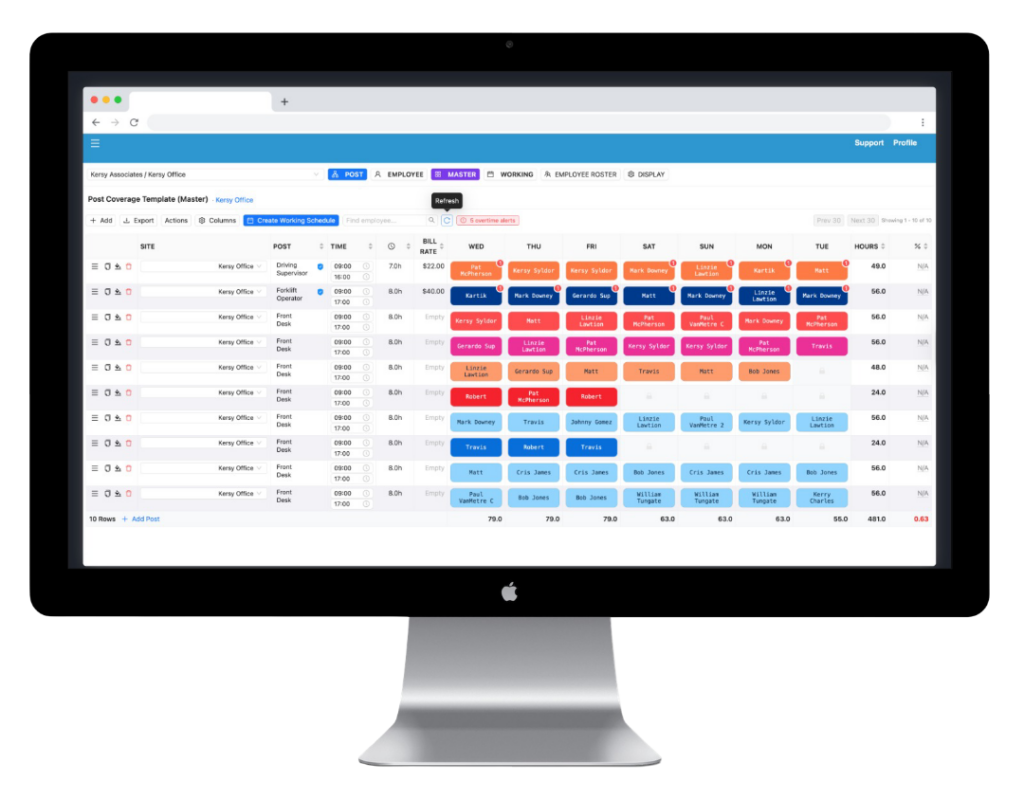
Many businesses start with spreadsheets, group texts, or manual schedule updates. ScheduleMetrics gives managers a more organized way to build schedules, make changes, and keep teams aligned.
Improve Visibility Across the Team
ScheduleMetrics helps managers stay on top of shift changes, coverage gaps, attendance issues, and scheduling activity without relying on scattered messages or guesswork.
Keep Scheduling Simple but More Controlled
The platform is built to stay easy to use while giving businesses more structure, accountability, and consistency than a basic scheduling tool.
What Is the Best Employee Scheduling Software for Small and Medium-Sized Businesses?
The best employee scheduling software for small and medium-sized businesses depends on how your team operates, how often schedules change, and how much visibility you need to manage daily operations.
Some tools are built for basic scheduling and availability management. Others help businesses improve accountability, reduce missed shifts, and gain better visibility into workforce activity.
For businesses managing shift-based teams, the right scheduling software reduces confusion, saves time, and helps operations run more smoothly. Businesses with growing teams, multiple managers, or more dynamic scheduling demands often need more than a basic scheduling app.
Best Employee Scheduling Software Comparison
The right platform depends on whether you need simple scheduling, stronger accountability, better operational visibility, or a more scalable system for growing teams.
Software
Best For
Scheduling
Mobile Access
Shift Alerts / Notifications
Reporting / Visibility
Time Tracking
Data Export / Workflow Fit
Ease of Use
Pricing Style
ScheduleMetrics
SMBs needing scheduling, visibility, accountability, and operational structure
Scheduling
Strong
Mobile Access
Yes
Shift Alerts / Notifications
Yes
Reporting / Visibility
Strong
Time Tracking
Yes
Data Export / Workflow Fit
Strong / Flexible
Ease of Use
Very Easy
Pricing Style
Custom Pricing
Deputy
Teams needing broad scheduling and time tracking
Scheduling
Strong
Mobile Access
Yes
Shift Alerts / Notifications
Yes
Reporting / Visibility
Moderate
Time Tracking
Strong
Data Export / Workflow Fit
Moderate
Ease of Use
Easy
Pricing Style
Subscription
Homebase
Small hourly teams with simple scheduling needs
Scheduling
Strong
Mobile Access
Yes
Shift Alerts / Notifications
Yes
Reporting / Visibility
Basic to Moderate
Time Tracking
Strong
Data Export / Workflow Fit
Basic
Ease of Use
Very Easy
Pricing Style
Free + Paid Tiers
When I Work
Businesses needing employee scheduling and team communication
Scheduling
Strong
Mobile Access
Yes
Shift Alerts / Notifications
Yes
Reporting / Visibility
Moderate
Time Tracking
Moderate
Data Export / Workflow Fit
Moderate
Ease of Use
Easy
Pricing Style
Subscription
Sling
Teams needing lightweight scheduling and communication
Scheduling
Moderate
Mobile Access
Yes
Shift Alerts / Notifications
Yes
Reporting / Visibility
Basic
Time Tracking
Moderate
Data Export / Workflow Fit
Basic
Ease of Use
Very Easy
Pricing Style
Free + Paid Tiers
See How ScheduleMetrics Improves Scheduling, Visibility, and Team Accountability
If your team needs more than a simple schedule grid, ScheduleMetrics gives you a more structured way to manage shifts, visibility, and daily operations.
The software should make it easy to build schedules, make updates quickly, and keep the team informed without creating unnecessary admin work.
Mobile access for managers and employees
Managers and employees should be able to access schedules, updates, and shift changes from anywhere without relying on scattered texts or emails.
Shift alerts and communication
A strong scheduling platform should help reduce confusion by making shift changes, reminders, and updates visible and easier to act on.
Attendance, accountability, and operational visibility
As teams grow, businesses need more than a calendar. They need visibility into attendance patterns, missed shifts, schedule consistency, and where staffing issues are affecting operations.
Reporting and manager oversight
The right platform should help managers identify scheduling issues, spot workforce patterns, and make better staffing decisions with less guesswork.
Compliance and qualification controls
The right system should help businesses avoid preventable staffing mistakes by making it easier to manage overtime exposure, employee qualifications, certifications, and scheduling eligibility.
Workflow fit and operational flexibility
Scheduling software should fit into the way your business already operates and support broader workflows such as reporting, team coordination, and day-to-day management.
License and certification tracking
Managers should be able to track required employee qualifications, monitor expiration dates, and reduce the risk of assigning the wrong person to the wrong shift.
Why Small and Medium-Sized Businesses Outgrow Basic Scheduling Apps
Many businesses begin with spreadsheets, group texts, or simple scheduling tools. That works initially, but as teams grow and schedules become more dynamic, the limitations become clear.
As scheduling gets more dynamic, communication becomes fragmented, shift changes become harder to manage, and missed coverage starts creating operational friction. Managers spend more time reacting and less time staying ahead.
Effective scheduling software should go beyond basic scheduling and help businesses stay organized, accountable, and easier to manage as operations become more complex.
Why Businesses Choose ScheduleMetrics
Built for shift-based teams
ScheduleMetrics is designed for businesses where scheduling is tied directly to daily operations, staffing reliability, and team coordination.
Simple scheduling without unnecessary complexity
The platform is built to stay easy to use while still giving managers the structure they need to keep schedules organized and current.
Better accountability and visibility
ScheduleMetrics helps businesses stay on top of schedule changes, shift coverage, attendance patterns, and daily workforce activity.
Useful reporting for day-to-day operations
Beyond schedule creation, ScheduleMetrics helps businesses gain visibility into how scheduling is affecting operations and where issues are showing up.
A strong fit for growing teams
As scheduling complexity increases, ScheduleMetrics gives businesses a more organized and scalable system for managing workforce operations.
More than basic scheduling
ScheduleMetrics can also support broader workforce management needs such as visibility, operational workflows, dispatch-style coordination, and other team management functions beyond shift scheduling alone.
Bring More Structure and Visibility to Your Scheduling Process
ScheduleMetrics helps businesses move beyond reactive scheduling and manage shift-based teams with more consistency, accountability, and control.
ScheduleMetrics is a strong fit for businesses that manage hourly teams, rotating shifts, attendance-sensitive workflows, and day-to-day operations that depend on reliable staffing and clear scheduling visibility.
It works especially well for businesses that need more structure than a simple scheduling app but do not want the complexity of a bloated workforce management platform. It is well suited for businesses ranging from smaller shift-based teams to growing multi-manager or multi-location operations.
healthcare support teams
cleaning services
retail teams
hospitality teams
field service teams
shift-based operations teams
Compare ScheduleMetrics to Other Scheduling Tools
Want a closer look? Compare ScheduleMetrics directly to other employee scheduling platforms and see which solution best fits your business.
Common questions about employee scheduling software, pricing, features, and choosing the right platform for your business.
What is the best employee scheduling software for small and medium-sized businesses?
The best employee scheduling software depends on how complex your scheduling process is, how often shifts change, and how much visibility you need into daily operations. Businesses with shift-based teams often need more than a simple calendar and benefit from tools that improve communication, accountability, and workforce visibility.
How much does employee scheduling software cost?
Pricing varies by platform, features, and team size. Some tools offer basic free plans, while others provide more advanced scheduling, tracking, and reporting capabilities through paid plans or custom pricing.
Is employee scheduling software worth it for a small or mid-sized team?
Yes. Even smaller teams often save significant time and reduce avoidable scheduling issues by using software instead of spreadsheets, group texts, or manual scheduling methods.
What features should businesses look for in scheduling software?
Key features include schedule creation, mobile access, shift alerts, team communication, visibility into attendance and scheduling changes, reporting that helps managers stay ahead of staffing issues, and the ability to export useful operational data when needed.
Can scheduling software reduce no-shows and missed shifts?
Yes. Better scheduling visibility, notifications, and communication tools help reduce missed shifts, confusion, and last-minute staffing problems.
What is the difference between scheduling software and workforce management software?
Scheduling software focuses primarily on building and managing employee schedules. Workforce management software is broader and may include payroll, HR, compliance, labor forecasting, and other operational tools.
What industries benefit most from scheduling software?
Any business that relies on shift-based teams can benefit, including healthcare support services, cleaning companies, retail businesses, hospitality operations, field service teams, and other workforce-driven organizations.
Ready to Simplify Employee Scheduling?
Book a demo or request pricing to see whether ScheduleMetrics is the right fit for your business.
See how it works, explore pricing, and find out whether it is the right fit for your business.